
To write a packaging design brief, define the project context, describe the product, identify the target audience, outline brand and visual guidelines, specify technical limitations, list deliverables, set milestones, finalize the budget, and confirm the approval process. A well-prepared brief minimizes errors, streamlines production, and aligns all stakeholders. Common mistakes in a packaging design brief, such as missing product data, outdated regulatory text, or unclear review sequences, can cause rework and delays. Using a template helps capture all critical elements efficiently and ensures consistent, accurate communication across teams.
- What is a Packaging Design Brief?
- How to Create a Packaging Design Brief?
- 1. Define the Project Context
- 2. Describe the Product
- 3. Identify the Target Audience
- 4. Outline Brand and Visual Guidelines
- 5. Specify Technical and Manufacturing Constraints
- 6. List Required Outputs and File Deliverables
- 7. Set the Timeline and Milestones
- 8. Finalize the Budget
- 9. Confirm the Approval Workflow
- Why a Packaging Design Brief Matters?
- What are the Common Mistakes in Packaging Design Briefs?
- Packaging Design Brief Template
What is a Packaging Design Brief?
A packaging design brief lists product facts, brand rules, and production parameters in one document. Manufacturers, small business owners, and design teams use a packaging design brief to align product facts, brand rules, and production constraints before artwork starts. The key elements of a packaging design brief give designers a short set of facts they rely on during layout.
How to Create a Packaging Design Brief?
Creating a packaging design brief involves providing key information that defines the project’s objectives, product details, target audience, brand guidelines, technical requirements, required deliverables, timeline, budget, and approval workflow. The writing steps are outlined below:
- Define the Project Context
- Describe the Product
- Identify the Target Audience
- Outline Brand and Visual Guidelines
- Specify Technical and Manufacturing Constraints
- List Required Outputs and File Deliverables
- Set the Timeline and Milestones
- Finalize the Budget
- Confirm the Approval Workflow
1. Define the Project Context
The project context explains why the packaging design project exists and what business goals it supports. It outlines whether the work is for a new product launch, a rebrand, a seasonal promotion, or a packaging update due to regulations or sustainability changes. The context ensures designers understand the strategic purpose behind the packaging, not just the aesthetic requirements.
For example, suppose a beverage company is redesigning its iced tea bottle to compete better in the natural drinks category. In that case, the context may highlight declining shelf visibility or consumer demand for eco-friendly containers. This information helps designers shape their approach to better meet the company’s real objectives, like improved recognition or alignment with market trends.
2. Describe the Product
A clear product description helps designers understand exactly what they’re designing for. The description should include the product’s features, ingredients, usage, physical form, flavor variants, and key benefits or selling points. Designers use this information to highlight the right messages and choose visual cues that accurately represent the product.
For example, a skincare brand launching a vitamin C serum may note that the serum is lightweight, fast-absorbing, and made with 15% stabilized vitamin C. These details guide the designer to emphasize qualities such as brightness, purity, and effectiveness, perhaps using citrus imagery, fresh colors, or premium textures on the packaging.
3. Identify the Target Audience
The target audience defines the buyer group that directs the visual hierarchy, claim placement, materials, and functional choices on a pack. Demographic data such as age, gender, region, and income, plus psychographic factors such as routine, values, and product‑use patterns, frame what cues the designer highlights.
For example, if the product is a protein snack aimed at gym-goers aged 18–35, the design may use bold typography, energetic colors, and strong on-pack benefit statements like “20g Protein.” If the intended audience were parents buying snacks for children instead, the design would use softer colors, playful elements, and clearer nutritional messaging.
4. Outline Brand and Visual Guidelines
Brand and visual guidelines ensure packaging remains consistent with the overall brand identity. Outlines include brand colors, typography, logo usage rules, illustration style, photography approach, and tone of voice. It also outlines restrictions such as elements the designer must avoid to prevent off-brand visuals.
For example, a minimalist skincare brand may require a white-dominant color palette, simple sans-serif fonts, and clean layout grids. It may also specify no decorative patterns or bright colors, ensuring the packaging fits seamlessly with the brand’s existing product line and maintains a premium, understated look.
5. Specify Technical and Manufacturing Constraints
Technical and manufacturing constraints ensure the design can be manufactured properly. The requirements include packaging dimensions, dielines, materials, print limitations, mandatory labels, barcode placement, and regulatory requirements. Designers need to know what is physically possible to avoid producing designs that cannot be printed or assembled.
For example, a chocolate bar wrapper may require a two-color flexographic print process, meaning gradients or detailed photographic images are not feasible. The brief may also state that the packaging must include an allergen warning, nutrition table, batch code area, and a certain amount of space for heat-sealing essentials that must be considered in the layout.
6. List Required Outputs and File Deliverables
List required outputs and file deliverables, exactly what the designer must deliver at the end of the project. Deliverables may include print-ready packaging files, layered working files, 3D mockups, SKU-specific variations, and brand asset libraries. File formats such as AI, PDF, or EPS, and color profiles such as CMYK or Pantone require clear naming so production teams can read the artwork data without confusion.
For example, a canned beverage might require label artwork for each flavor, a master template for future flavors, plus 3D can renderings for marketing use. The designer may also need to supply a final packaging guideline document so future designers can follow consistent standards.
7. Set the Timeline and Milestones
The timeline sets expectations for how long each project stage will take. Milestones may include concept sketches, first drafts, revisions, pre-press checks, prototyping, final approvals, and delivery of production files. Clear deadlines help the designer manage their workload and ensure timely completion.
For example, a cereal-box redesign may allow two weeks for concept development, one week for feedback, one week for revisions, and another week for finalizing files and preparing print-ready artwork. Setting these dates prevents delays and ensures alignment with production and launch schedules.
8. Finalize the Budget
The budget sets the financial limits that control material selection, print methods, finishing options, and production counts. The brief specifies the cost per unit, substrate choices such as paperboard or PET, print processes such as flexographic or digital, and finishing constraints such as coatings or embossing.
For example, a luxury perfume box may allow for embossing, metallic foiling, and high-quality rigid board due to a high price point. In contrast, a low-cost snack product might restrict the designer to basic CMYK printing on standard cardboard to keep unit costs under $0.05.
9. Confirm the Approval Workflow
The approval workflow lists each reviewer, the review order, and the acceptance criteria for packaging accuracy. The sequence commonly includes marketing, product development, regulatory, and quality, if claims, nutrition data, or hazard panels appear on the pack.
For example, packaging for a new vitamin supplement might require graphical approval by the marketing team, factual approval by the product development team, regulatory approval from legal, and final approval from the brand director. A clear workflow ensures the designer knows exactly who they must satisfy at each stage of the process.
Why a Packaging Design Brief Matters?
A packaging design brief matters because it gives one reference that lists the core attributes of a pack project and keeps all teams aligned. It compiles project objectives, product details, audience insights, brand rules, technical limits, and legal text in a single place. Designers use this information to create artwork that fits print restrictions and production steps. Engineers and regulators use the same information to check accuracy and compliance, if additional checks arise. Clear briefs reduce the common causes of rework, such as missing dielines, unclear targets, or absent regulatory copy. The brief also supports fast decisions because every project reviewer reads the same data reference before approving artwork.
What are the Common Mistakes in Packaging Design Briefs?
The common mistakes in packaging design briefs include:
- Missing project attributes such as objectives, scope limits, or the trigger for the pack update. For example, such as reformulation and size change.
- Incomplete product data, such as item codes, weight statements, or ingredient details. For example, 250 mL net content.
- Absent brand elements, including color codes, logo files, or typography instructions. For example, Pantone values and vector logos.
- Missing technical files such as dielines, substrate notes, or print tolerances. For example, a dieline PDF, which blocks clear layout and material decisions.
- Incorrect or outdated regulatory text, such as allergen copy, hazard panels, or claim qualifiers. For example, GHS symbols.
- Undefined functional constraints linked to closure type, barrier limits, or sealing zones. For example, heat‑seal margin and oxygen‑barrier rating.
- Unclear approval sequence where reviewers or acceptance criteria are not named. For example, quality sign‑off and legal fact check.
Packaging Design Brief Template
A ready-to-use packaging design brief template helps capture all essential details, streamline the process, and minimize mistakes.
The image given below shows a structured packaging design brief template with nine labeled sections. Each section groups essential inputs such as context, product facts, audience traits, brand elements, technical constraints, deliverables, timeline points, budget caps, and approval roles. The layout highlights how one document organizes all attributes the designer reads before artwork starts.
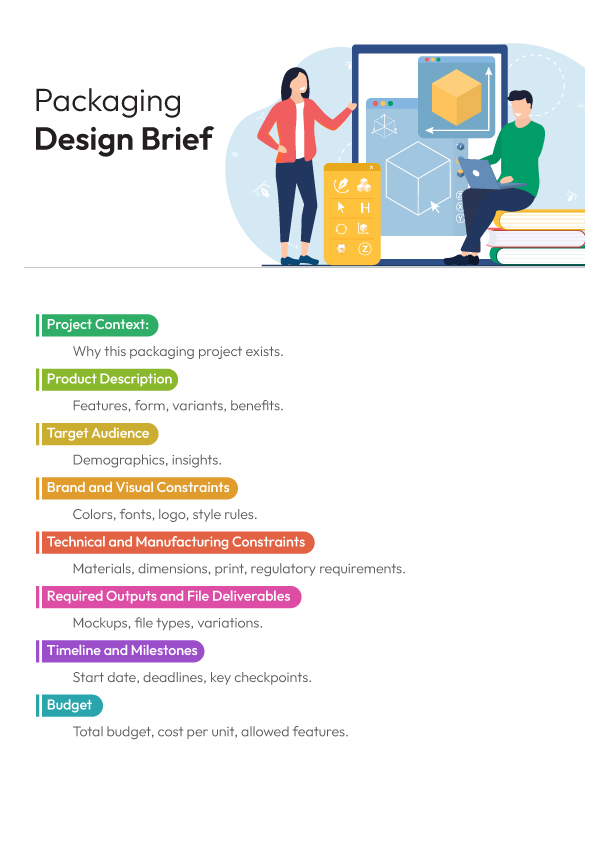
The diagram gives a quick snapshot of how these attributes sit together and how each section supports factual accuracy, technical fit, and consistent artwork development.
What are the key elements of a packaging design brief?
The key elements of a packaging design brief include project context, product information, target audience details, brand guidelines, technical constraints, required deliverables, timeline, budget, and the approval process.
- Project context describes why the pack update exists, such as a reformulation or a size change.
- Product information lists factual data like item code, weight statement, or ingredient set.
- Target audience details define buyer groups with demographic and routine cues.
- Brand guidelines state color codes, logo rules, and typography requirements.
- Technical constraints identify dielines, print limits, substrate notes, or seal zones.
- Required deliverables specify print‑ready files, layered artwork, and SKU variations.
- Timeline sets dates for concept checks, revisions, and pre‑press review.
- Budget fixes cost limits tied to substrates, print methods, or finishing steps.
- Approval process lists reviewers, sequence, and acceptance criteria for factual and visual accuracy.
Who approves the packaging design brief?
The packaging design brief is approved by the brand lead or project owner, with input from technical and regulatory reviewers if the packaging contains claims or regulated information.
Is using a template helpful for packaging briefs?
Yes, using a template for packaging briefs is very helpful, as it saves time and ensures that all critical information is included.